Documentation Summary
Resend Orders And Artwork
Resending Orders
Sometimes an order will fail to send to Shuttleworth, this may be due to missing key values, shipping or payment information, product or user misconfiguration or issues while rendering the artwork, etc…
The Resend Order button appears on the AdminOrders page if:
- Any of the items contained by the order is created from is set as Shuttleworth Job or SOP
Pushing the button will attempt to resend the order to Shuttleworth, processing only items that weren’t processed by original ordering process ( items not yet updated with Shuttleworth ID )

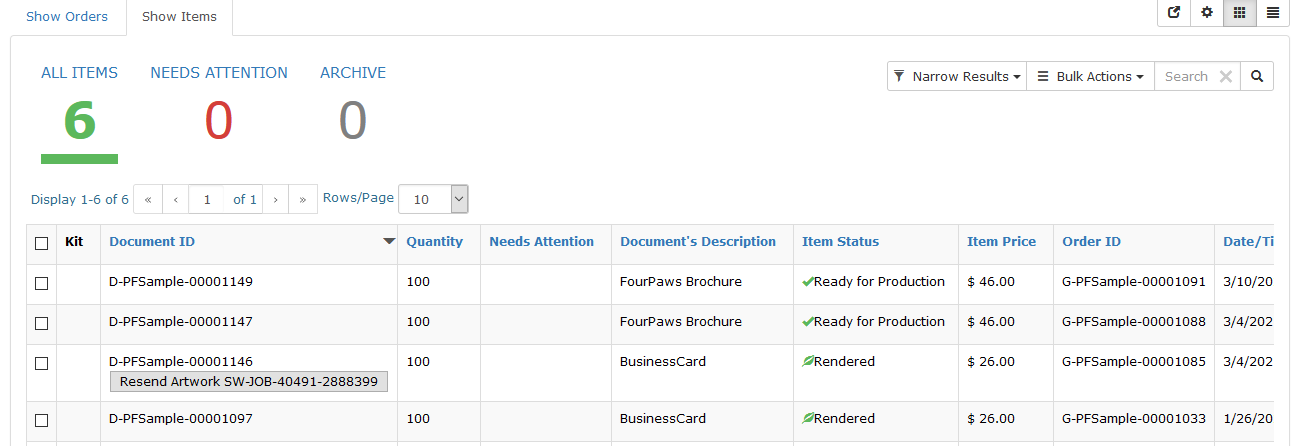
Resending Artwork
The Resend Artwork button appears on the AdminOrders/Items tab if:
- The product that item is created from is set as Shuttleworth Job
- The item has already been ordered by Shuttleworth ( a Shuttleworth ID has been received )
- Image transfer is set up, see Artwork Links.
Pushing the button will attempt to resend the artwork to Shuttleworth.