 Documentation Summary
Courier Tracking
Courier tracking and delivery information can be pulled into an ordered item’s details from Shuttleworth. Order Update behaviour must be enabled to do this.
The following fields are available for tracking information. They must be created as product printing options as an order may be broken down into multiple shipments. Please note the names of the fields are case sensitive. If the fields have not been created, these values will not be saved in Storefront.
- TrackingRef
- ProposedDate
- ProposedQuantity
- ActualDate
- ActualQuantity
These are case sensitive.
If a field does not exist then it will not be used.
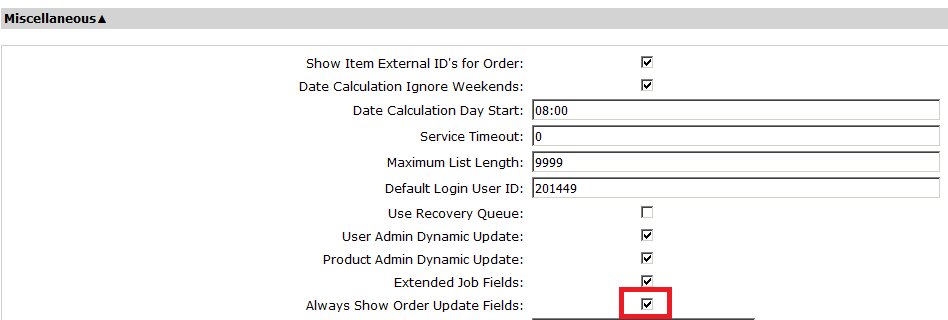
To avoid showing the tracking printing options before the user places their order, the fields should be set to hidden for users in the field configuration. There is an option to “Always Show Order Update Fields” which should be enabled to show the hidden fields on the order item details page.
Tracking references may be shown for administrators and users.
Both courier name and tracking reference need to be present in order update post.
Courier name is then seeked for in the parsing definitions set in extension configuration.
Correct parsing definitions must be set in format: couriername1,link1;couriername2,link2;
CourierRef variable would get replaced by the value provided by Shuttleworth Order update post. For example:
Parcelforce,<a target=”_blank” href=”http://www.parcelforce.com/track-trace?trackNumber=[CourierRef]”>Parcelforce Tracking ([CourierRef])</a>;DPD Local, <a target=”_blank” href=”http://www.dpdlocal.co.uk/apps/tracking/?reference=[CourierRef]”>DPD Local Tracking ([CourierRef])</a>;RoyalMail,Royal Mail tracking not available;
Showing Tracking Links
The order page cards can be modified to show tracking links using the following syntax from Storefront 9.3 onwards.
{{tackingLink.href}} which corresponds to the the tracking URL.
{{tackingLink.title}} which corresponds to the name of the courrier service.
These must be within an reapeating div element as shown in the example on the Showing IDs page so it can list the values when there are multiple tracking links in an order.