 Documentation Summary
Addresses
The delivery address behaviour is set from the user context. The normal behaviour for a delivery address with the Shuttleworth integration is to send across the address as a bespoke address which gets put into the system as a one off. If you wish the end user to pick an address (invoice or delivery) then you must set up a selection in the correct section in Storefront.
For delivery selection the field is defined in the “Schema Fields” section as an [OrderField]:

This field allows for the selection of a Shuttleworth delivery address for sending to SOP or Job.
For invoice selection the field is defined in the “Schema Fields” section as an [OrderField]:

This only applies to SOP as you cannot currently change the invoice address on a Job.
The other mapping fields determine which fields in Storefront map to which fields in Shuttleworth:
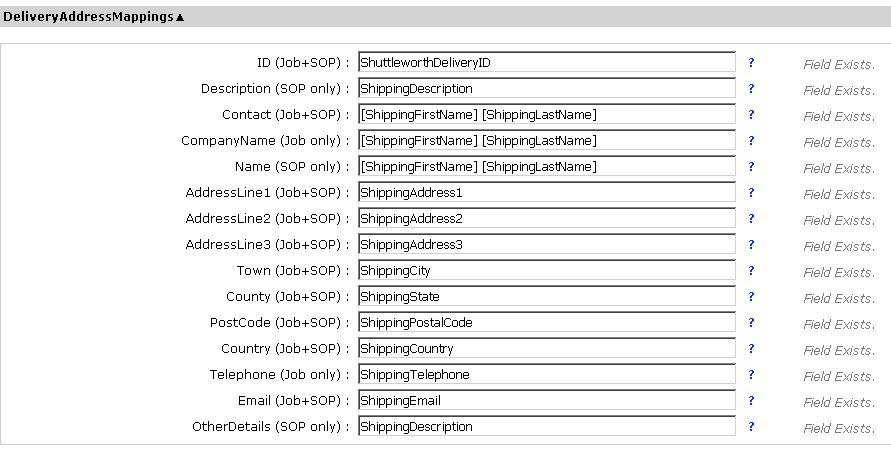
The fields that apply to Job and SOP are noted and these are used to map at the time of ordering for ad hoc orders only. If a Shuttleworth Delivery ID is set and the the delivery method is lookup then this will be used to lookup the address to send to Shuttleworth.
Multiple Storefront fields can be mapped to a single Shuttleworth field by surrounding each field in square brackets (e.g. ‘[ShippingFirstName] [ShippingLastName]’ will give you ‘John Smith’).