 Documentation Summary
Authentication Keys
Before the RightMarket extension can be used to acquire data, Storefront user accounts must be linked to RightMarket user accounts. Upon joining the RightMarket reseller program, you should have been provided with credentials to the RightMarket administrative area at http://app.rightmarket.com. If you have not already done so, please login to the RightMarket administrative area to create RightMarket user accounts for your customers. Instructions for using the RightMarket administrative area is provided in a separate document and in many cases should be self-explanatory.
RightMarket and Storefront accounts are linked using what is called an “Authentication Key”. Each RightMarket user account has an authentication key that is visible in the RightMarket administrative area when you open up user accounts. To provide maximum flexibility in terms of access and budget control, RightMarket accounts can be linked to Storefront in 3 different ways depending on your need: At individual Storefront user levelAt Storefront user group levelAt Storefront deployment level When a Storefront user logs in and uses the RightMarket extension to acquire data, it will attempt to use the RightMarket key in the order noted above. If an authentication key can be found at the user level, this key will be the preferred key to use. Failing to find an authentication key at the user level, the RightMarket will look for an authentication key at the user group level and then finally at the deployment level. You do not need to enter an authentication at every level.
Universal Authentication Key And User Group Keys
The universal authentication key and user group keys from the desired RightMarket user account can be set on the main extension configuration page as illustrated below.
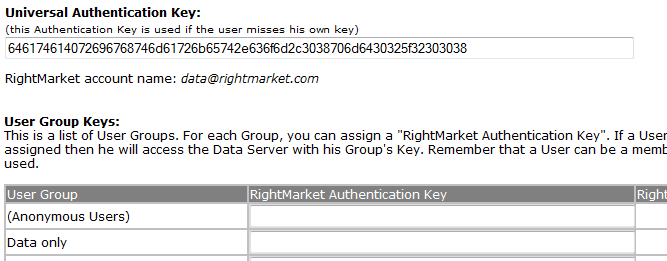
The universal authentication key is accessible to all Storefront users in the deployment. Once you have pasted the authentication key and clicked the update button to save the changes, check back in the settings page and you should see the appropriate RightMarket account name displayed underneath.
User group authentication keys are shared between all users within the group. Checking back on the main extension configuration page, you should see the appropriate RightMarket account name displayed in the next table column “RightMarket Account Name” in a similar fashion to the universal authentication key. It is important to remember that a user can be a member of multiple user groups. In this case, the first user group key that is found will be used. Having users in multiple groups with keys assigned to them is not recommended for this reason.
Individual User Authentication Key
To link RightMarket accounts with Storefront accounts at user level, you will need to copy and paste the authentication key to the Storefront user profile field called “RightMarket Authentication Key” as illustrated below. This profile field is automatically created by the extension. Authentication keys entered here are only accessible to the individual user in question.
