 Documentation Summary
Troubleshooting
Compatibility
The Extension must be installed on Storefront 9.8 and newer.
The emails are reliant on the asset.rightmarket.com and email subfolder for most icons and logos as well as the customer logo on each deployment. SVG format is not supported for compatibility with older email clients.
Limitations
Emails can only be sent to users with a valid email address in their UserProfileEmailAddress field. The task tries and extracts valid email characters in order to tolerate irrelevant typos. Addresses which were not accepted are recorded in the Log.txt.
Known Issues
Not applicable.
Logging
Each email run creates a folder, e.g. the campaign run on 01/02/2025 leaves:
WebPages/ROI360/New Template Notifications/Log/2025-02-01
The folder contains a subfolder called Email which contains the HTML content which was sent to each individual user. If the Test Mode was On at the time of sending, then nothing was really sent, only the email HTML content was recorded in the Email subfolder.
The Log subfolders, whose names are “older” than one year at the time of the run, are automatically deleted. The Email subfolders and all of their content is automatically deleted if their name is “older” than three months.
A copy of the email sent to the last evaluated user by the process is sent to spotcheck.newtemplatenotifications@rightmarket.com. This is to allow staff to spot check any potential issues. Note that if the last evaluated user did not receive an email for any reason, then there will be nothing to copy.
Debugging
In order to test if the mail server can actually send an email to a user’s mail client, a testing Scheduled Task needs to be created with Task Arguments:
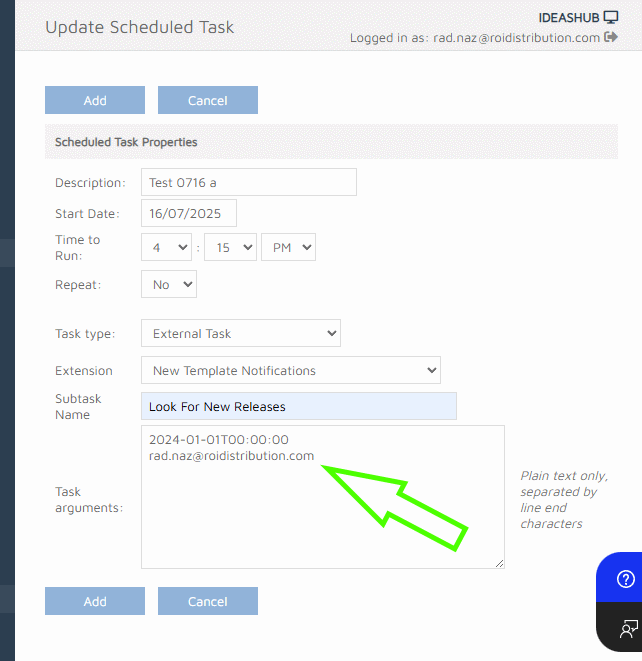
If the task is run with the arguments as above, it is considered a testing task, no matter if the Test Mode is On or Off. With the Test Mode off, it is the only way to test the actual email delivery without launching an avalanche of user emails.
Two lines must be entered in the Task Arguments text-box:
- The “Last Ran” date and time - sets the check’s “from” date. This is very useful in case the default - two months back - isn’t enough to produce a certain number of “new templates”.
- An email address of an existing user - the tester - to which the email is actually sent. The rest of the site-users are ignored. Please make sure there is a user with this email address among the site-users.