 Documentation Summary
Functionality
User Site
The Tone Of Voice Assistant is an Extension that adds markup and
JavaScript to the Storefront Product Customise Step page.
The text-content of each text-box is checked for inappropriate expressions
(it happens in the text element’s oninput event handler,
meaning warnings appear as the user types).
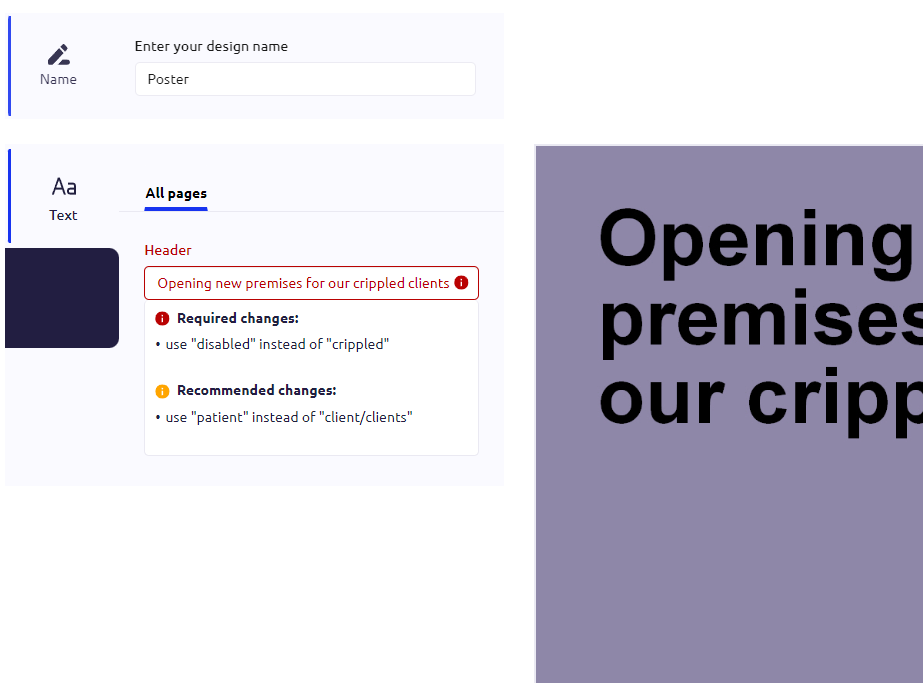
If one or more inappropriate expressions are found,
a tool-tip window shows up, suggesting better alternatives (if configured).
The red icon marks expressions which prevent the submission of the form,
the edited document can’t be completed.
The yellow expressions are only suggestions, the document can be completed with them.
User is creating a new document. Their text input is checked:
If a rule has a Tip, then it is appended to the warning text:
The tip seamlessly follows the warning:
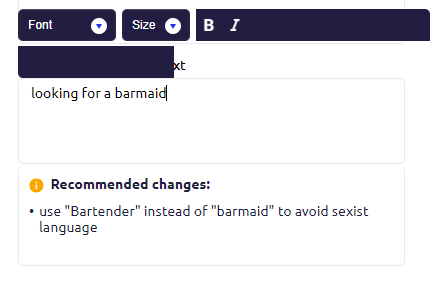
Note: Tips should be written in a way that flows naturally, so that together with the suggestion, they make up a readable sentence.
Admin Site
The administrative site contains the dictionary.
New pairs of Avoid > Alternative can be added.
The dictionary items can also be deleted as needed.
Event Logging
Two events are recorded outside the Storefront deployment:
- Expression Shown In Tool-Tip
- Design Finalised
Two different central storage locations are used:
- Microsoft Azure SQL Database
- Pendo
Both events Expression Shown In Tool-Tip and Design Finalised are recorded in Azure in two different tables.
In Pendo, only the Expression Shown In Tool-Tip is recorded by sending an HTTP request.
Pendo requires sending a secret key.
We store this key in our shared folder
\\O1\Data\Tone of Voice Assistant
which is only accessible to our platform administrators.
After the Editing Step page is loaded in the browser, for a particular text-box,
the expression shown in the tool-tip is recorded only once, that is,
if the user types an inappropriate expression in a text-box, the expression is recorded.
If it is deleted from the text-box and re-typed again, no re-recording takes place.
Re-loading the page with a different design makes the recording start afresh.
The Design Finalised event is recorded right after
the user clicks the Add to Basket, Download or Submit for Approval button.
Apart from the specification of the deployment, user,
template and design, these pieces of information are recorded:
- one or more Tool-Tips were shown at the moment the user clicked the button (true or false)
- a Tool-Tip was shown while editing before the button was clicked (true or false)