 Documentation Summary
Configuration
To configure the extension toggle the following options on the configuration page in Storefront Administrator under ‘Administration > Extensions > Save Draft’:
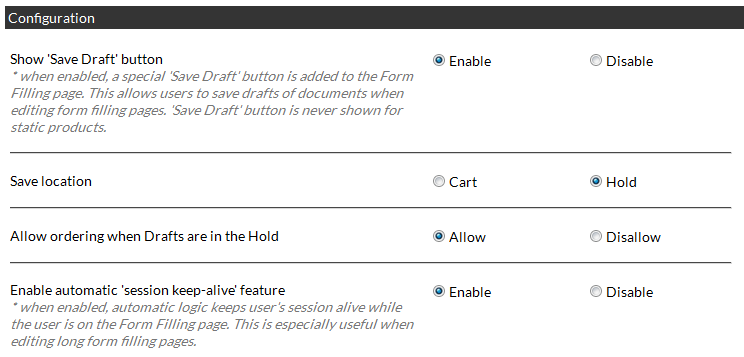
Show ‘Save Draft’ button
This will display a button with the text ‘Save Draft’ on it on the form filling, this will allow the users to add drafts to their basket. When this button is clicked, the item is stored in the specified location (Hold queue by default), without the user leaving the form fill step, the name of their document has changed to include the word [DRAFT] at the beginning.
Save Location
Choose where the Draft is saved, either in the user’s basket or the hold queue.
Allow ordering when Drafts are in the Hold
This controls whether the user can order whatever is in their basket when a draft is in their hold. If this is set to ‘Disallow’ and the user attempts to proceed to checkout with Drafts in their Hold queue, they will prompted to edit the current document. They will not be able to proceed until they have edited and saved their Drafts, ready for ordering. Please note, that ordering with Drafts in the basket is never allowed no matter if this option is set to ‘Allow’ or ‘Disallow’.
Enable automatic ‘session keep-alive’ feature
This feature will periodically ping the server to keep the users session (login) active while they are on the form filling page, this would be beneficial on products that have a large number of variables that the user has to fill out and might be timed out midway through and they do not want to save the current document to Draft. Under normal circumstances session timeout might occur after 20-30 minutes. Please note for products with many/large images or high system usage, this feature may slow down the site.