 Documentation Summary
Functionality
Project Discovery Page
The page shows a calculation of estimated cost and time savings for any given time period, based on the date range selection at the top right of the page. By default, the previous 12 months are selected.
There is a full breakdown of the number of designs created for each template on the site. Kits and Hosted PDFs are not shown in the list. Each template is assigned a type based on its name. Based on the template type and number of designs created, an estimated cost and time-saving is shown for each individual template (see #calculationsfor details).
Template naming changes are backwards compatible. If a template is renamed, all previous designs created will show under the latest template name (the name of the master template is always used).
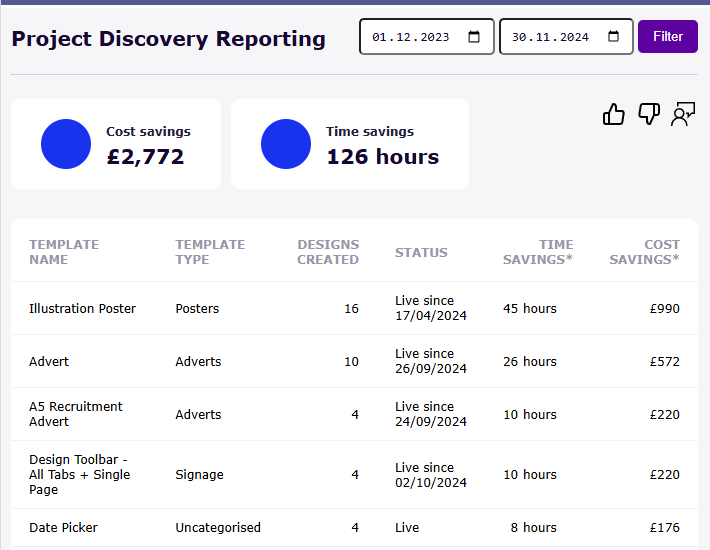
Top of the page
At the bottom of the page there is the option to download a copy of the data for further analysis.
The question mark at the top of the page and the link below the table both show the same Pendo guide when clicked, explaining the calculations to customers.
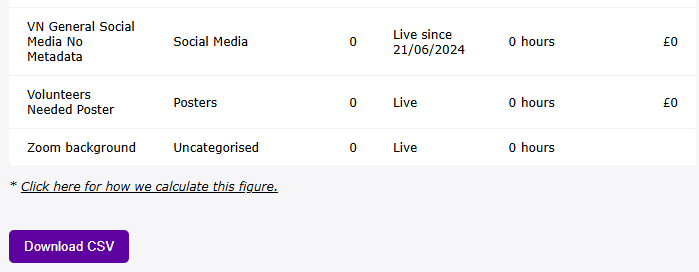
Bottom of the page
Status
The Status of the Template refers to the latest release and can be:
- Archived - the last release got archived within the selected date range
- Live - the latest release has been live through all of the selected date range
- Live since (date) - the latest release went live within the selected date range
Calculations
We calculate the template type of each template based on keywords in the template’s name, so an A4 Welcome Poster would be classed as a Poster.
We document all our customers’ estimates of the time taken to produce a design manually relative to the template type. We then take the interquartile mean (to remove outliers) of this to calculate the average time to create a design without RightMarket for each template type.
We then use the Design Toolbar session data, combine the data for each document and assign a template type. We then calculate the mean time taken across our userbase for each template type, to calculate the average time taken to produce a design in RightMarket for each template type.
We can subtract the average time taken to produce a design without Rightmarket from the average time taken to produce the design in Rightmarket to work out the average time saved to produce a design in RightMarket for each template type.
We can then look at current customer usage data, assign each item a template type and based on the cost savings for each template type, work out the total time savings for any given time period.
Multiplying these time savings by an estimated hourly cost (currently L22) to produce, we can then work out the total estimated cost savings for a given time period.