 Documentation Summary
Sections
The database can be split into different sections, where only users with sections in their profile matching the record’s will be able to see and select it (e.g. showing only some records to certain office locations). Each database must have a section column. See the image below for an example of how sections might work.
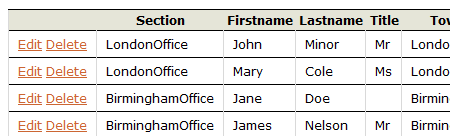
The user profile field ‘FormFillingDatabaseSection’ determines which section a user is in. In the example below, the user will only see records relating to a Watford branch, whereas a user whose section was ‘BirminghamOffice” might instead see records for branches in Smethwick or Solihull. If left blank the user will see all records.
