 Documentation Summary
Troubleshooting
Compatibility
No compatibility issues at present.
Limitations
No limitations at present.
Known Issues
No known issues at present.
Logging
Errors are logged in the site-log.
Debugging
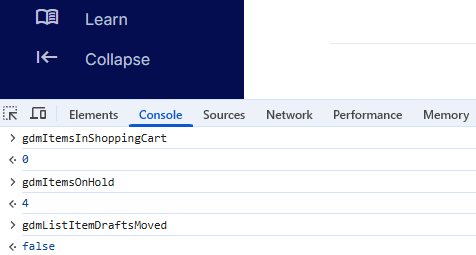
While on user-site, in your browser window, hit the F12 key, then select the Console tab. This Extension injects JavaScript into the source-code of each user-page and - while running - leaves a number of global variables. All of them start with the prefix “gdm…”. The letters stand for Generated Document Manager which is the code-name of this Extension. With the browser console on, please start typing “gdm…” and observe if the browser displays the variables in a drop-down box. Try and select one of them (gdmItemsOnHold for instance), then hit Enter. The browser should display the value. This is the basic check to see if the Extension is working all the way through from the back-end server to the client browser. If there aren’t any “gdm” variables present, please check the admin-site. Make sure the extension is present and enabled. If so, check the site-log for any related errors.
Browser console: "gdm" variables and their values