 Documentation Summary
Setting Up
Installation
The Document Actions assembly DLL is added by the Studio designer to a Template Project folder:
Example: A6_Postcard\Document Actions\ChangeCMYKColour.dll
The studio designer can then configure a Job to call the method
SetColour(name, components)
Studio Project
Change CMYK Colour is a Document Actions assembly that allows the Studio designers to configure the Jobs to call the method SetColour(name, components).
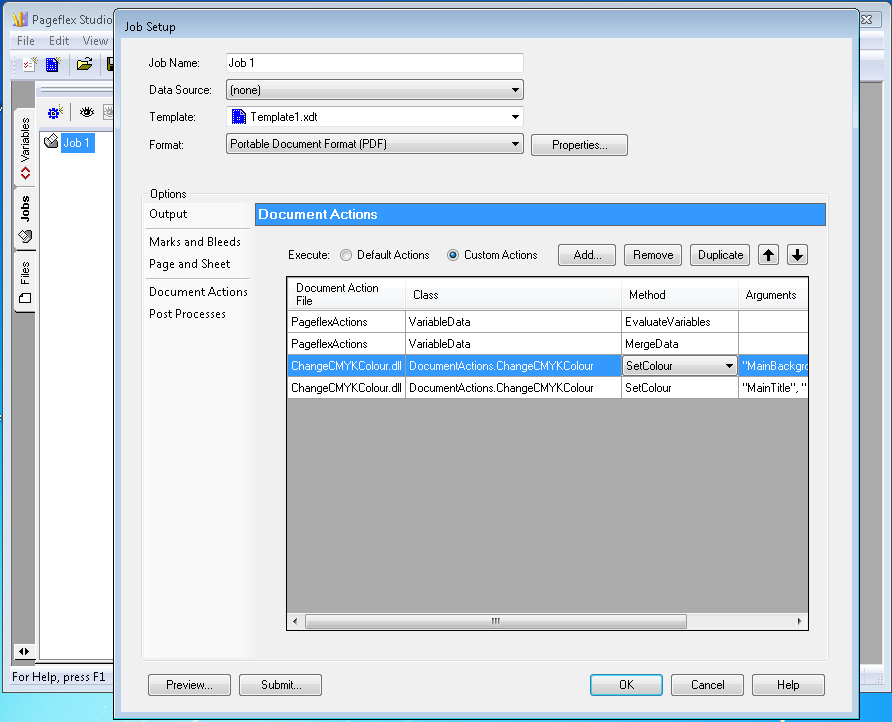
Studio Document Actions
The method SetColour(name, components) accepts two arguments:
-
colourName
It is the name assigned to a custom colour in Studio when designing a Template.
-
colourComponents
It is a text that consists of three or four numbers separated by commas or spaces.
When three numbers are provided, they are considered RGB values and must fall in the range 0 to 255.
When four numbers are provided, they are considered CMYK values and must fall in the range 0 to 100.