 Documentation Summary
Setting Up
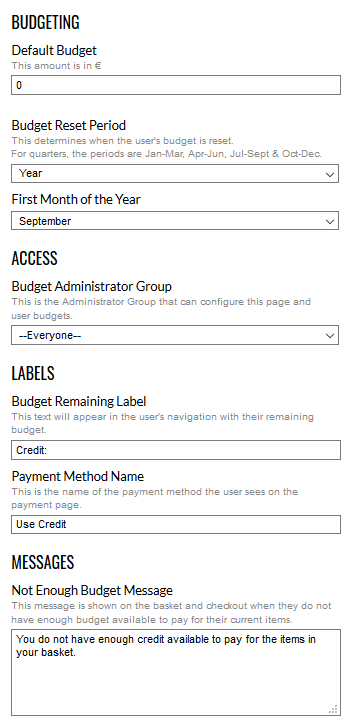
To configure the extension, navigate to the budget administration page and click on the Settings button.
Budgeting
The Default Budget applies to all active users, unless overridden by their Personal Budget.
The Budget Reset Period determines how far back through a user’s order history the extension will calculate the budget against. All timeframes start from the 1st of a month.
First Month of the Year can be set for using financial year. Spending of annual budgets would be calculated starting selected month. Default setting is January.
Only orders placed where Budgeting is the selected payment method (see below) are taken into account when calculating how much budget a user has consumed.
When total cost of such orders exceed the budget available, warning messages are shown on shopping basket page and all checkout steps (see below).
Users cannot place new orders (using Budgeting payment method) when their available budget is insufficient. Attempting to do so will redirect the user back to the shopping basket.
Access
Access to the budget administration page and settings can be limited to a subset of administrators. Any administrators not in this group will not see the link to the page, nor will they see it on the extensions page.
Labels
Text for the Budget Remaining in the user navigation pane can be customised.

If a user clicks on this, they will be redirected to their user profile, which shows the budget bar for more information on their current usage.
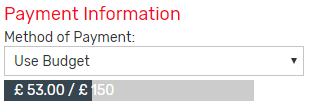
The name of the payment method can be changed. Selecting budget as the payment method will show the budget bar on the payment step.
Messages
A message is shown on the shopping basket and checkout pages when user does not have enough budget available to pay for items in ordering process.

Alternatively, if the user has used all their budget exactly, or has had their budget reduced below what they have already spent, a different message is shown.
Saving the changes always redirects the administrator back to the budget administration page.

Installation Files
The following files must be installed in these Storefront directories:
/Bin/BudgetingPages.dll
/Bin/Extensions/BudgetingExtension.dll
/_AdminBudgetingUserDetail.ascx
/AdminBudgeting.aspx
/AdminBudgetingConfig.aspx