 Documentation Summary
Setting Up
This extension allows for a multi-country breakpoint delivery system with multiple breakpoint rules based on quantity or weight of delivery.
Configuration
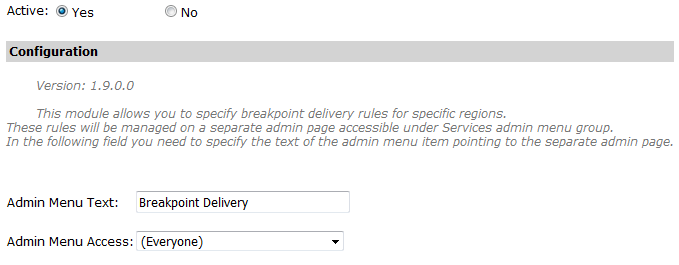
When the extension is first installed, a new product metadata field is created, called ‘BreakpointDeliverSelectRuleForProduct’ denoting the breakpoint delivery rule for a product. You can select one of the quantity based rules for each product or leave the default value ‘Product uses weight based rules’.
To set up the extension, go to ‘Administration > Extensions’ on the Storefront Administrator website.
In the configuration, the text that will appear in the left admin menu can be set in the ‘Admin Menu Text’ field. There is also the ‘Admin Menu Access’ drop down that can be used to limit access to the breakpoint rules management admin page to only a specific admin group. By default every admin user has access to the page.
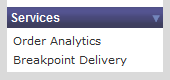
After the extension has been activated, a new tab will appear on the left menu with the name entered in the extension setup.
Installation Files
The following files must be installed in these Storefront directories:
/WebPages/_AdminBreakpointDeliveryBody.ascx
/WebPages/AdminBreakpointDelivery.aspx
/WebPages/bin/BreakpointDeliveryPages.dll
/WebPages/bin/Extensions/BreakpointDeliveryExtension.dll
/WebPages/Custom/BreakointDelivery/BreakpointDelivery.resx