Documentation Summary
Managing Breakpoints
Click on the menu item as specified in the ‘Admin Menu Text’ configuration field to administer the breakpoints. The Breakpoint Delivery administration page has three sections: Upload Breakpoints, Edit Breakpoints and Previous Versions of Breakpoint Rules.
Upload Breakpoints
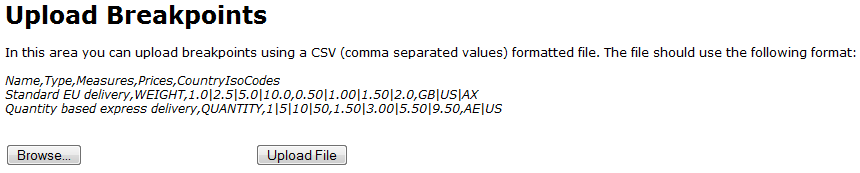
| You can also upload CSV (comma separated values) formatted files containing multiple breakpoints and regions, the file should use the following format: Name,Type,Measures,Prices,CountryIsoCodes Standard EU delivery,WEIGHT,1.0 |
2.5 | 5.0 | 10.0,0.50 | 1.00 | 1.50 | 2.0,GB | US | AX Quantity based express delivery,QUANTITY,1 |
5 | 10 | 50,1.50 | 3.00 | 5.50 | 9.50,AE | US |
Edit Breakpoints
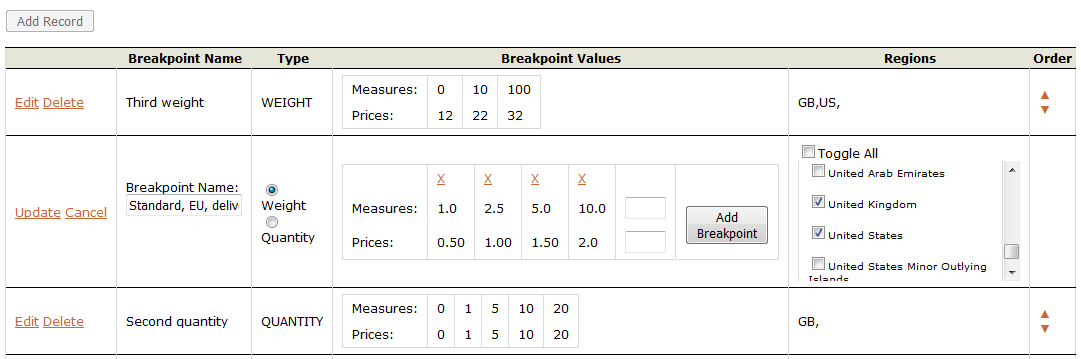
In this area you can add/edit/delete breakpoints and assign them to relevant geographical areas. The ‘Add Record’ button underneath allows you to add new breakpoints. Breakpoints are based either on weight or quantity. Each breakpoints consists of a series of measures and a corresponding series of prices. Breakpoint names of Quantity breakpoints are then used on the product metadata field’s admin page where each product should have a breakpoint assigned. Breakpoint names of Weight breakpoints are used on the shipping step page of an order where users can select an appropriate delivery method.
Measures are units of quantity (pieces) or units of weight (g or oz.). Units of weight used here have to be compatible with units of weight defined in Site Options section of administrative area. Prices are in the currency of the target region.
Example: (Measures - weight: 0.1, 0.5, 1.5, 5, 10) (Measures - quantity: 1, 5, 15, 50, 100) (Prices: 0.2, 0.4, 0.6, 1, 1.5) (Regions: United Kingdom, Ireland).
Previous Versions of Breakpoint Rules
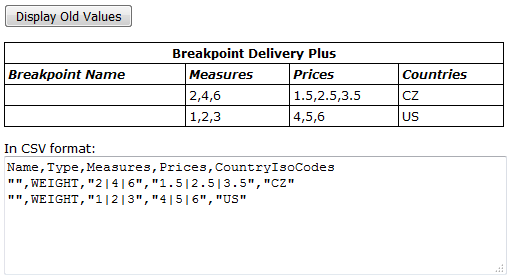
If you had a previous version of Breakpoint Delivery (such as Weight Breakpoint or Quantity Breakpoint extensions) you can import the values of these breakpoints into the new extension. In this area you can check if your system contains any values from previous Breakpoint extensions like ‘QuantityBreakPointDelivery’ and ‘Weight Breakpoint Delivery’. If they exist, they will be displayed after you click the ‘Display Old Values’ button. You can use the CSV format of the old values, adjust them, add missing fields and save to a file which you can then use for CSV upload at the top of the page.