 Documentation Summary
Setting Up
To configure the extension, navigate to the extension’s administration page.
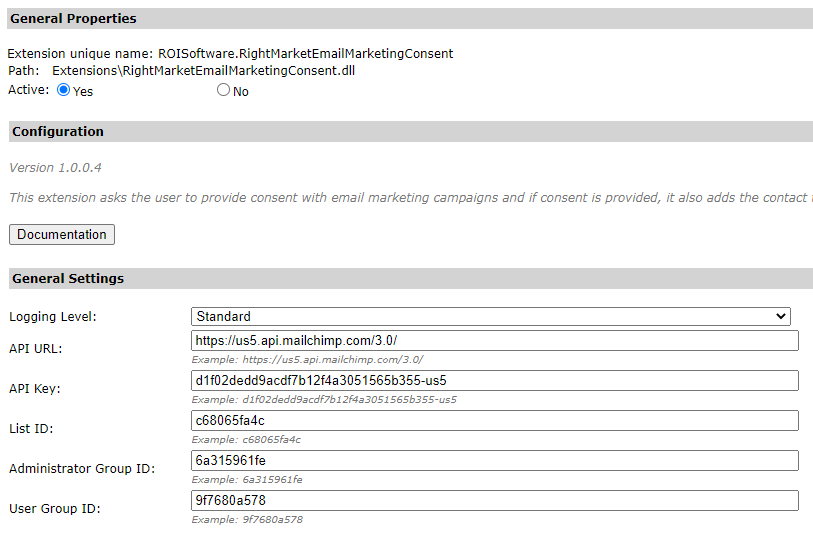
Logging Level
Select logging level depending on the requested detail level of the information logged.
Standard - only errors during image acquisition and processing are logged.Debug - all results of ResourceSpace API calls are logged in detail.
The Standard logging level is preferred to make it easier to spot errors.
API URL
Specify the API URL of the MailChimp API account (e.g.: ‘https://us5.api.mailchimp.com/3.0/’).
API Key
Specify the API Key to access MailChimp API. The API Key is used for common access to MailChimp API for all Storefront users. Navigate to the MailChimp User Profile (click on the bottom-left icon in MailChimp web application > Profile) and go to Integrations > API keys to obtain a valid API Key for the user account intended to be used as the API client for the deployment.
List ID
Specify the ID of the MailChimp audience/list (e.g.: ‘c68065fa4c’). You can obtain the ID in the MailChimp web application by going to Audience dashboard. Then click on Manage Audience > Settings and scroll down to the bottom of the page.
Administrator Group ID
The ID of the Administrator group within the MailChimp API system. This ID can be obtained via API calls.
User Group ID
The ID of the User group within the MailChimp API system. This ID can be obtained via API calls.