 Documentation Summary
Troubleshooting
Compatibility
Not applicable.
Limitations
It is best to set maximum and minimum values for height and width variables, as Templates will generally struggle to handle dramatic changes to the aspect ratio.
Known Issues
When entering the dimensions argument value as a Constant directly using the Studio, please separate the numbers by spaces:
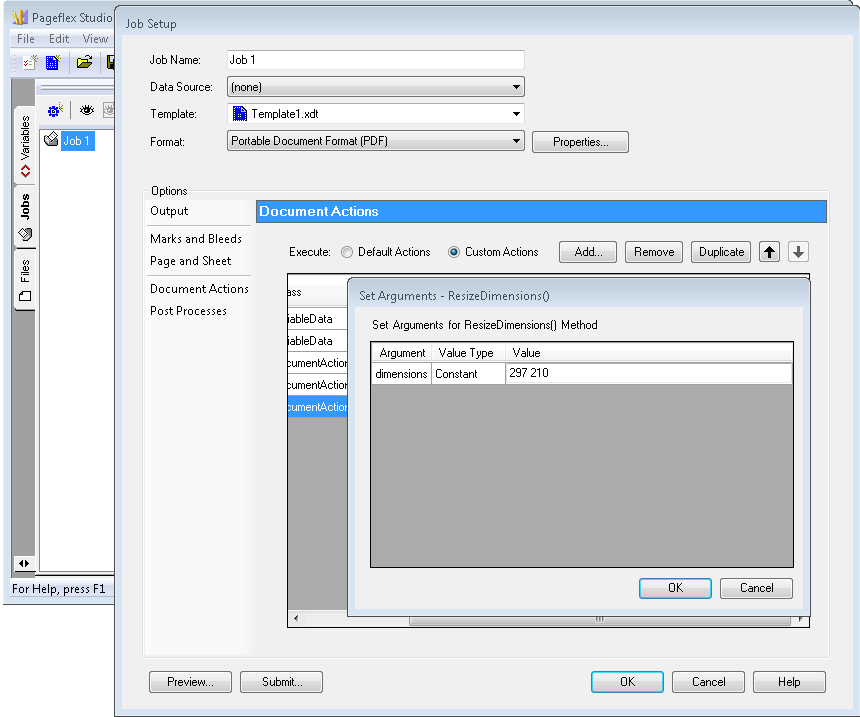
The width and height separated by spaces.
The comma character is fine when the argument value is populated from a Project Variable or when the resulting .pf file is edited manually. If Studio 8 is used to enter the argument value and the numbers are separated by a comma, then the resulting .pf file looks like this:
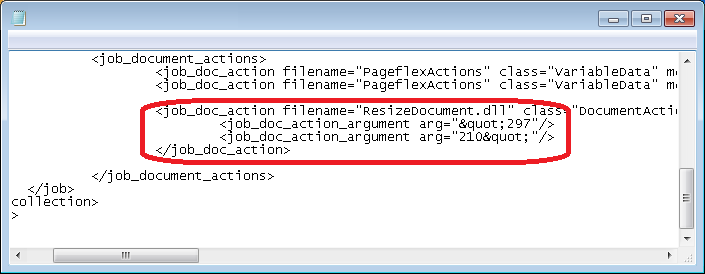
The Studio writes the constant argument wrongly in the .pf file.
Instead of one argument which contains a comma character, there are two, damaged. This error makes the Design fail when rendered by the artwork server and the true reason of the failure doesn’t even appear in the rendering log.
Logging
Calling the methods with none or wrong arguments is the usual reason of failure. All of the cases are specifically recorderd in the rendering log and also in the final output folder log file.
Example of the messages logged by the methods:
- Missing the ‘height’ argument.
- Expecting ‘height,width’ and not ‘297210’
- ‘height’ must be a number and not ‘H210’
- 297.00000 - the maximum of 3 decimal places allowed
Debugging
In case the assembly was added to a live Template Project and the document processing fails, please make sure the .pf file contains the job_doc_action node with correct filename, class and method:
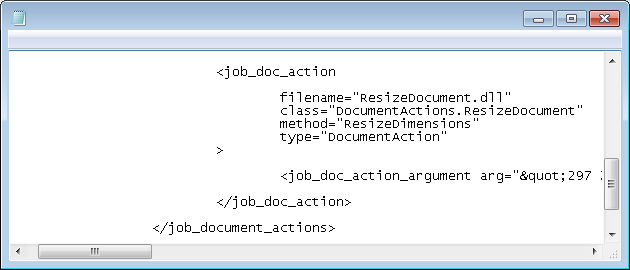
The job_doc_action node in the .pf file.