 Documentation Summary
Setting Up
Installation
Extension Configuration
In the Storefront extensions admin area it is possible to adjust the the logging level.
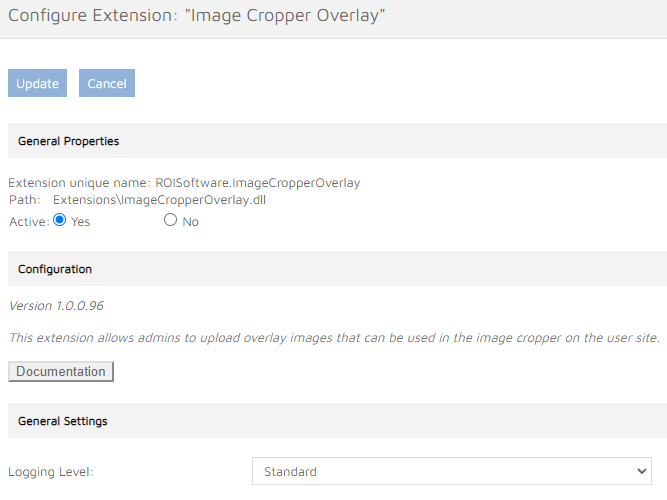
Image Field Configuration
Image Cropper Overlay is configured in the admin area. Each template’s Form Filling (Editing) step can contain multiple image choice controls with the Image Cropper Overlay logic enabled. When the extension is running and ‘Upload Button’ > ‘Suggest Image Editor Crop Size (Aspect Ratio)’ check boxes are ticked, the ‘Add Image Cropper Overlay’ check box and the file upload control are displayed. When an overlay image file has been uploaded, its file name is displayed in the ‘Current Image:’ label.
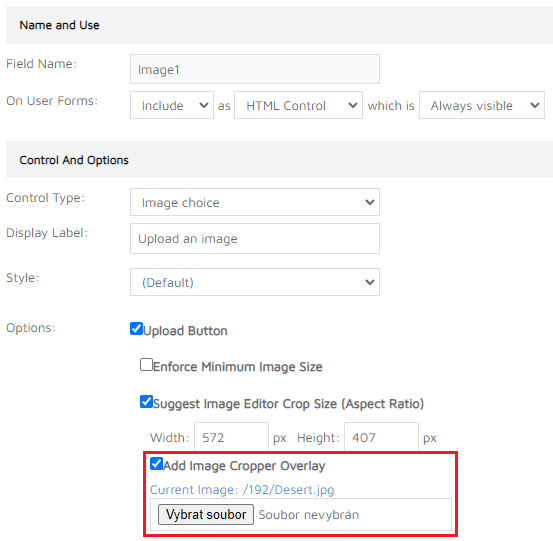
The overlay image files are stored in subfolders named using the current product’s master ID.
Installation Files
The following files must be installed in these Storefront directories:
/WebPages/bin/Extensions/ImageCropperOverlay.dll
\