 Documentation Summary
Functionality
For the selected category, only the Tone of Voice Assistant amber warning is evaluated.
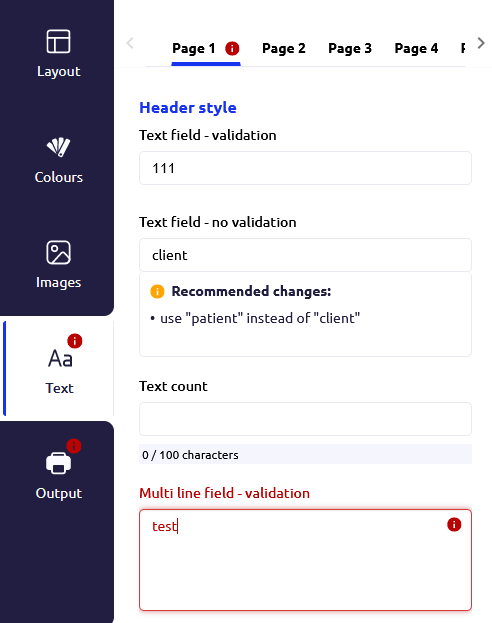
For the selected category, now both the Tone of Voice Assistant amber warning and red validation warning are present, the red warning is preferred.
Event Logging
The Design Toolbar logs events to a dedicated SQL Server database.
These are:
- The time the editing session started
- The time the editing session ended
Editing Start Time
When a user creates a new document, the editing page is loaded. When any control within the editing step is accessed or changed for the first time for the design, a new editing session is created. Each editing session has a unique identifier in the form of a GUID value. This type of event is logged only once for each editing session. The following fields are logged: GUID (the session unique identifier), Deployment (the name of the deployment), UserName (the name of the user logged in), IPAddress (the IP address of the user’s client computer), Design (External Document ID of the document being edited), Template (name of the product being edited), StartTime (time the editing session started).
Editing End Time
The end of the editing session is logged, when one of following actions are performed:
- Downloading the output (Download)
- Saving progress (Save)
- Adding to cart (AddToCart)
- Submitting For Approval (SubmitForApproval)
If the editing session already exists, its EndTime and Action fields are updated.
If editing session hasn’t been started yet
(the user created a new document and without accessing the editing controls
and immediately clicked on one of the buttons),
the session record is created and updated with ending fields values
at the same point as the Editing End Time.
Notes
A new editing sesison is created and logged as new entry in the database when a user continues editing a saved design from their drafts. A new entry is not created if the user continues editing their design after clicking the save button as long as they don’t leave the page before clicking a button which would finalise the design. A new entry is also created when user uses browser’s page reload button during editing the design or user navigates back using browser’s back button from drafts or orders.
Event logging functionality is available only for products with Design Toolbar Field Categories set for form filling step.