 Documentation Summary
Setting Up
If a product has configuration that matches multiple rules, the first matching rule is always used.
If no rule matches, the output would instead get rendered according to the common Storefront output folder.
Supported Product Types
Pageflex Print products are fully supported.Hosted PDF and PDF Upload products are only supported when the product Final Output Action is set as Set status to ‘Rendered’ and copy to Output Folder.HTML products are supported, however the created subfolder is relative to the HTML output folder rather than the standard output folder.Kits are supported. The kit zip file is generated in its normal location, but the kit parts output are generated to defined folders by rules.Data Merge products are supported based on the above product types, regardless of whether output is generated per job, record or batch (all output is generated in a single folder).
Configurable Output Folders Rules page
The Configurable Output Folders Rules page is accessible from Administration/Services menu link. The link title and access based on administrators groups can be set in extension configuration page.
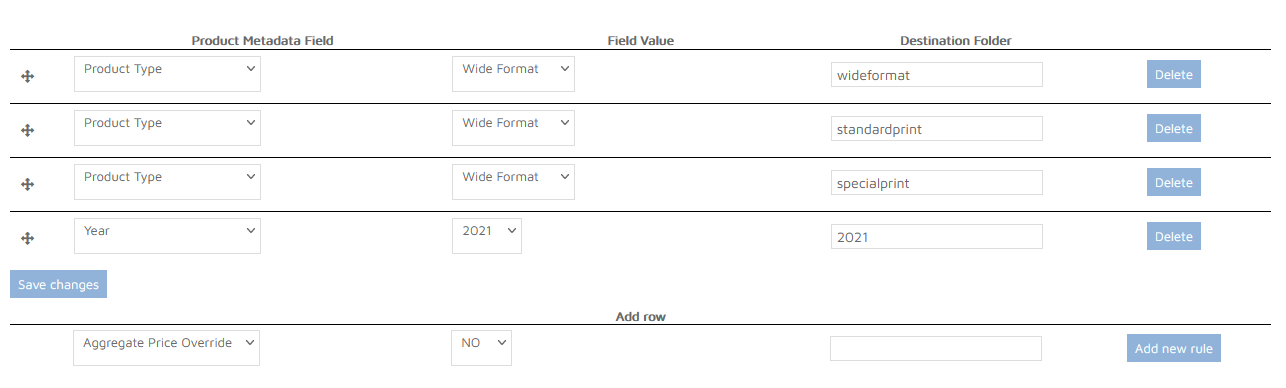
The Product metadata dropdown contains all product metadata fields defined for products on the deployment.
The Field Value dropdown/textbox should contain the value of the selected product metadata field to match the rule against.
The Output folder defines a subfolder in the root of the deployment’s output folder, where the rendered output would be rendered to if the product matches the rule.
Folder name can contain numbers and letters only up to 15 characters.
The rules can be reordered by dragging and dropping.