 Documentation Summary
Setting Up
The API can be enabled and configured from the administrator site by navigating to “Extensions” -> “Storefront API”
The API must be enabled before it can be used and has 3 settings to fill in.
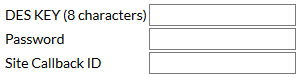
The DES Key must be 8 ASCII characters long and is used for encrypting values in the API calls.
The Password is used to generate the access token to validate API calls.
More information on how to use these values can be found in the Encryption section.
The Site Callback ID is used only in Callbacks to identify which deployment the POST has come from. This means it is not required if you don not use callbacks. You can enter any value but it should be something you can use to identify the deployment.
More information on how this is implemented can be found in the Callbacks section.
Endpoint
Because the API is deployment-specific (instance-specific), each instance of the API has its own endpoint.
The API endpoint for each deployment will be the “roiwebinterface.asmx” page. You can browse to this page to see a description of all the API calls.